
Security
Last modified October 26, 2026
Benchmark runs execute LLM-generated code: setup scripts, dependency installs, the benchmark's task_impl.py, and whatever shell commands the agent decides it needs. That code is untrusted in the same way any third-party code is untrusted. This page describes the mechanisms that keep the secrets you've stored in your vault out of that code's reach, and is honest about the places where the boundary has known gaps.
1. Threat model
We defend against:
- The agent reading your vault values directly (file reads, env-var dumps, process introspection of the proxy).
- The agent making outbound HTTP requests to attacker-controlled hosts to exfiltrate data.
- The agent mis-using a real credential by sending it to the wrong host (e.g. an OpenRouter key sent to
api.evil.com).
We do not defend against:
- A compromised Benchwright cluster (the operator can read everything; that's why operators publish a security model).
- Bugs in mitmproxy, chisel, or the Python standard library (supply-chain risk).
- TLS-pinned hosts the agent intentionally reaches — pinned hosts can't be intercepted, so the agent's traffic to them is unfiltered. In practice this is rare for consumer APIs.
- Side-channel attacks (timing, cache analysis).
2. The boundary: sandboxes per run
A run spawns up to four kinds of isolated sandbox, or five through the Harbor bridge, depending on the benchmark and launch mode. A run that fans out has one task sandbox per task, so a wide run has many boxes rather than four. Each is a separate container with its own filesystem, process namespace, and network path. They cannot read each other's memory, environment, or files.
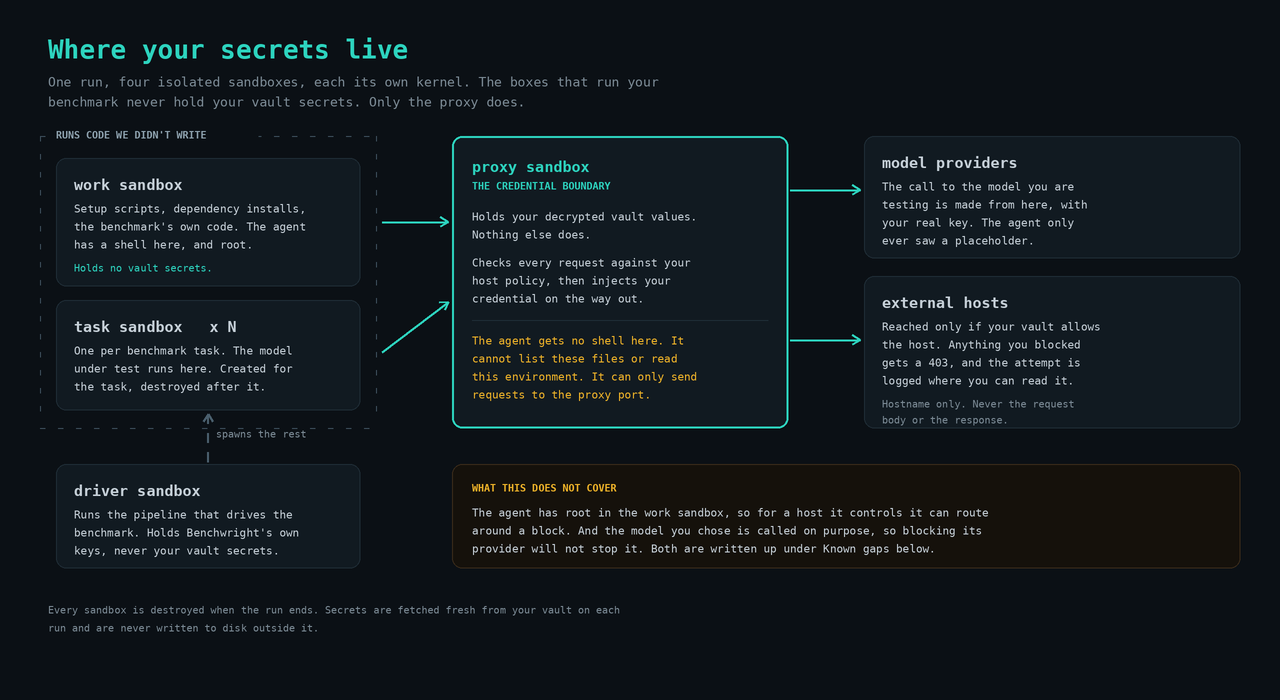
Task sandboxes appear only when a benchmark fans out: one per task, created for that task and destroyed when it finishes. They follow the same rules as the work sandbox and never hold vault credentials.
Runs that go through the Harbor bridge add one more box, an orchestrator sandbox, which runs the Harbor CLI and spawns Harbor's own per-task environments. It holds no vault credentials either.
The work sandbox is the agent's playground. The proxy sandbox is the credential boundary. The agent cannot get a shell in the proxy sandbox; it cannot list its files; it cannot read its environment variables. It can only send HTTP requests to the proxy port, and the proxy decides what to do with them.
The exact isolation primitive depends on the compute backend a run lands on, and it is worth being precise about it. The default backend for every account is Benchwright Cloud, our own sandbox0 cluster running on DigitalOcean Kubernetes. There, each sandbox is a separate Kubernetes pod, and pods scheduled onto the same node share that node's kernel. The fallback backend is E2B, where each sandbox is a separate microVM with its own kernel. Per-run credential isolation holds on either backend: your vault secrets stay in a separate proxy sandbox that the agent cannot directly access.
All sandboxes for a run are torn down when the run finishes, with one exception. A run can ask for the proxy sandbox to linger past the end of the run (up to 24 hours) so its model-proxy dashboard stays inspectable. During that window the proxy sandbox still holds the run's credentials; it idle-pauses when nothing is talking to it, is resumed on demand, and is reaped when the window lapses. Outside of the run's own sandboxes, your secrets are never persisted on disk.
3. How the proxy enforces your vault
Your vault has three pieces:
- Secrets — named values (
OPENROUTER_API_KEY,GITHUB_PAT, etc.) you've stored under/manage/vault. - Rules — for each secret, where it should be injected: which host, as which header (or query param), in which scheme (
bearer,basic, rawheader,query). - Host policy — an allow / block decision per host plus a default. Hosts can be added implicitly when you add a rule, or explicitly under
/manage/vault.
When a run starts, Benchwright fetches your vault over TLS and writes it to a config file inside the proxy sandbox. What protects that file is the sandbox boundary, not its permission bits: it sits on a different box from the agent, and the agent has no shell, no login, and no filesystem access there.
For each request the proxy receives:
- Look up the destination host in your
host_policy. If it'sblock, return HTTP 403 to the agent and log the attempt. - Otherwise, walk your rules. The first rule whose
host_patternmatches the destination wins; the proxy rewrites the request'sAuthorizationheader (or query parameter) to inject the matching secret value. - Forward the request to the real host using your real credential. The agent never saw the real value — only the request shape.
The proxy uses its own per-run TLS certificate authority to terminate TLS for the intercepted hosts. The work sandbox trusts that CA at run setup. The CA's private key lives only in the proxy sandbox and is destroyed with it.
4. Scope of interception
The proxy intercepts only the outbound HTTPS traffic that your vault configuration designates for enforcement. A blanket interception model, in which every request from the work sandbox is routed through the proxy, was rejected for two reasons. First, it would impose proxy and TLS-termination overhead on requests for which the vault expresses no policy. Second, it would expand the proxy's TLS-interception surface to every host the agent contacts, including routine package and source repositories such as pypi.org, github.com, and apt mirrors. Any TLS-trust regression on those paths silently breaks dependency installation, which creates incentive for the agent to disable proxy settings and circumvent enforcement entirely.
Accordingly, in the default routing mode the proxy intercepts traffic to a destination host if, and only if, one of the following conditions is met:
- The host matches a rule in your vault, in which case the proxy injects the corresponding credential; or
- The host is designated as
blockin your host policy, in which case the proxy denies the request and records the attempt.
Traffic directed at any host that does not satisfy one of the above conditions is forwarded from the work sandbox to its destination without proxy involvement or TLS interception. To bring a host within the scope of enforcement, whether for the purpose of credential injection or denial, the host must be configured in your vault. Hosts not so configured are not intercepted, and Benchwright does not inspect or modify the corresponding traffic.
Because redirection works by pointing the work sandbox's /etc/hosts at the proxy, and /etc/hosts cannot express a wildcard, the default routing mode can only redirect exact hostnames.
Catch-all routing. There is a second routing mode in which every outbound request on ports 80 and 443 is redirected into the proxy and the proxy is the only way out of the sandbox. In that mode every host reaches the proxy, so wildcard patterns match and a default-deny policy is a real allowlist.
Your vault selects the routing mode; you do not choose it directly. Three settings cannot mean what they say under the default mode, so configuring any of them switches that run to catch-all routing:
- A
blockdefault. The complement of an allowlist is, by definition, hosts your vault does not name, and those are exactly the hosts the default mode never redirects. - A wildcard
blockentry such as*.evil.com, for the same reason one pattern at a time. - A wildcard rule such as
*.internal.example, which has nothing to inject into unless the traffic arrives.
Everything else keeps the default mode. A vault with an allow default and exact-match entries routes exactly as described above. Runs that egress through your own machine also use catch-all, for the same reason: your machine cannot police traffic that never reaches it.
Catch-all is not free, which is why it is scoped to the vaults that need it rather than being turned on for everyone. Every connection goes through the proxy sandbox instead of only the matched ones, so the proxy is on the critical path for all of them, and TLS is terminated for hosts the vault expresses no opinion about, including package and source repositories. If you set a block default, allow the hosts your benchmarks need before your next run, package hosts included; the starter pack on your vault page covers the common ones.
One consequence is worth stating plainly because it is a deliberate trade against availability. Under a block default the redirect is what makes the deny real, so if it cannot be installed in a sandbox the run stops with an error rather than proceeding with the deny inactive. A run that could not enforce your allowlist is not a run that happened to be slower; it is a run outside the boundary you asked for, and we would rather fail it than hand you a score from it.
5. What lives where
| Material | Lives in | Lifetime |
|---|---|---|
| Your decrypted vault values | Proxy sandbox, config file + proxy process memory | Per-run |
| Proxy CA private key | Proxy sandbox | Per-run |
| Proxy CA public cert | Trusted in the work sandbox | Per-run |
| Your model-provider key for the model | Proxy sandbox env (the model proxy reads it) | Per-run |
| Benchmark data, agent's task code, run results | Work sandbox | Per-run |
| Benchwright's own LLM key for the pipeline driver | Driver sandbox | Per-run |
| Benchwright's compute-control token for the run | Work sandbox (see gaps below) | Per-run |
None of these outlive the run's sandboxes, and secrets are pulled fresh from your vault on every run start. Where a run has asked for a proxy linger window, the three proxy-sandbox rows above live until that window lapses rather than until the run ends.
6. Auditing what got blocked
Every time the proxy refuses a request, it records it in blocked_host_log: your user, the run id, the host, how many times that host was attempted (seen_count), when it was first and last seen, and which enforcement point refused it (source, which is the run's proxy, your local-egress agent, or both). You see these in two places. Account-wide, under "Recent blocked hosts" on your vault page. Per run, in the denied-hosts card on the run dashboard.
Use this view to:
- Catch over-restrictive policy. If the agent keeps trying to reach a host you forgot to allow, the log shows you exactly what to allow.
- Spot exfiltration attempts. If a benchmark you didn't write is reaching
evil.example.com, the log captured it before the request escaped. - Promote trust on observation. Add an explicit allow entry for a host you've seen the agent reach repeatedly without issue.
There is a second log with the same guarantee. egress_route_log records, per run, which hosts were reached and by which route (through your tunnel, direct, or refused), and is readable at GET /v1/runs/{id}/egress-routes. It is a routing record rather than a traffic record: host and route only.
Both logs record hostnames, routes, and counts. Path, query string, request body, and response body are never recorded — there is no way for the proxy or this UI to leak the content of an intercepted request.
There is a third thing worth checking, and it is the absence of enforcement rather than a record of it. A run that went out without the proxy in the path says so under "Network the platform changed" on its dashboard, with the reason. A vault holding no rules, no block entries and an allow default has nothing for the proxy to do, and that reads as a plain note; a run whose proxy could not be set up reads as a warning, because its traffic left unfiltered. Both used to look the same from the outside, which is to say they both looked like nothing.
7. Known gaps and trade-offs
We're being explicit about these so you can decide whether the boundary fits your threat model.
-
The agent has
sudoin the work sandbox. It needs root to install packages, configure services, and run setup scripts. It cannot use this to read secrets (those are in the other sandbox), but a determined agent couldsudoto remove the/etc/hostsentries that route specific hosts through the proxy, defeating the block for that host. Plans to harden: split the work sandbox into a "setup" stage with sudo and an "execute" stage without. -
Your declared model bypasses host policy. When you select a model from your vault as your benchmark target, the work sandbox calls a translating proxy (litellm) at a fake URL, and that proxy makes the real outbound call from inside the proxy sandbox. The real call doesn't go through the enforcing proxy, so a vault
blockon (say)openrouter.aiwon't stop your declared OpenRouter model. By design — the model is what you explicitly asked to evaluate. If you want to forbid a provider, don't pick a model from it. -
TLS-pinned hosts can't be intercepted. A handful of consumer / financial APIs pin specific certificates and won't accept the proxy's per-run cert. Requests to those hosts fail with a TLS error rather than being silently bypassed. Fail-closed but not graceful.
-
Per-run CA. The proxy generates a fresh certificate authority for each run. There is no long-lived CA private key to protect, but the work sandbox has to install + trust the new CA at every spawn.
-
A default-deny policy costs you speed, and can cost you the run. This used to be listed here as a policy that did not apply to unlisted hosts. It applies now: a
blockdefault, a wildcard block, or a wildcard rule switches the run to catch-all routing, described in section 4. What is left is the price. Every connection goes through the proxy sandbox rather than only the matched ones, so runs are slower and the proxy is in the path of everything; TLS is terminated for hosts your vault says nothing about, so a package host you have not allowed will fail to install rather than being waved through; and if the redirect cannot be installed in a sandbox, the run stops instead of running with the deny inactive. Those are the terms of an allowlist. They are worth knowing before you switch the default, and they are the reason the default isallow. -
A vault we cannot read stops the run. This used to fail the other way: if the fetch failed for any reason, the pipeline skipped proxy wiring and the run continued with no host policy and no credential injection, silently. The reasoning was that a transient database problem should not kill a run in flight, and it did not survive contact with how runs actually work. Your model's API key is resolved when the run is launched, not by this fetch, so a run whose vault could not be read went on calling its model and scoring normally while the boundary it was supposed to run inside was simply absent. Now the fetch retries, and if it still cannot read your vault the run stops before any benchmark code executes, with the reason on the run. The cost is real and we would rather state it than hide it: a database problem at the wrong moment now fails a run that would previously have completed. We think an unenforced run that looks enforced is the worse outcome, because you cannot tell by looking at it.
-
A policy change made during a run only applies to sandboxes created after it. You can edit host policy while a run is halted for review, and the proxy picks up the new rules within seconds. Routing is different: sandboxes already running keep the routing they were wired with, so a change that newly requires catch-all cannot be retrofitted onto them. The run says so on its page when this happens. Relaunch to get the new policy enforced from the start.
-
Benchwright's compute-control token sits in the work sandbox. The pipeline needs it to create and tear down the sandboxes a run uses, and it lives in the environment of the same sandbox where the agent has a shell and root. So agent-generated code can read it. It cannot reach your vault, which is the boundary this page is about: it is a credential against our sandbox orchestrator, not against your secrets, and it is scoped to the environment the run belongs to.
We would rather spell out the rest of its reach than imply the gap is smaller than it is. Sandbox lifecycle operations inside that environment are the obvious part. Less obvious: on Harbor runs the same token is what the per-task image prebuild presents in order to obtain push credentials to our image build cache, which is one shared repository keyed by the content hash of the image, where the presence of a tag means "already built, skip the build." Whoever can push such a tag can influence what a later run executes. The token is an environment-scoped bearer with no expiry and no nonce, so anything that reads it holds it until the shared signing secret is rotated.
What limits the blast radius today: the token is scoped to a single environment and cannot enumerate resources it does not own, and per-task sandboxes in fanout mode never receive it, a split pinned by a test rather than by convention so that a refactor cannot quietly widen it. That test is deliberately narrow, though. It establishes that task sandboxes are clean; it does not establish that untrusted code cannot reach the token, and the work sandbox is exactly where untrusted code runs. Hardening: move sandbox orchestration behind a broker that the work sandbox talks to instead of holding the credential itself, and split the registry push credential out of the run token entirely.
If you have questions about the boundary or want to talk through your specific threat model, email legal@benchwright.ai with the subject line "Security" and we'll get back to you. To file a defect against a specific run, POST /v1/bug-reports with that run's id attaches the report to the run's trace.